10 Best Project Management Software for Small Businesses in India (2026 Guide)
Introduction
Managing one project is usually easy.
Managing ten projects at the same time is a completely different story.
As a small business grows, projects start involving more people, customers, deadlines, materials, expenses and documents. A project manager may need to coordinate employees while the sales team handles the customer, accounts manages invoices, and operations manages materials or vendors.
Many businesses try to manage all of this through Excel, WhatsApp, email and notebooks.
It may work initially.
But eventually, someone asks:
"Project ka current status kya hai?"
And the answer requires checking three different spreadsheets and several WhatsApp conversations.
That's when dedicated project management software becomes useful.
The right system doesn't simply create tasks. It helps your team understand what needs to be done, who is responsible, what has been completed, what it costs and what happens next.
For growing businesses, an even better approach is to connect project management with CRM, quotations, inventory, employees, vendors and invoicing.
This guide covers the best project management software options for small businesses in India and explains what you should consider before choosing one.
What Is Project Management Software?
Project management software helps businesses plan, organize, assign and track work.
Depending on the platform, it can help you manage:
- Projects
- Tasks
- Deadlines
- Team members
- Customers
- Documents
- Materials
- Expenses
- Project progress
- Invoices
- Reports
The objective is simple:
Know what needs to happen, who is responsible and where the project currently stands.
Why Small Businesses Need Project Management Software
Small businesses often manage projects using a combination of:
- Excel
- Phone calls
- Paper documents
- Separate billing software
The problem isn't that these tools don't work.
The problem is that the information is disconnected.
A customer may discuss a change on WhatsApp.
The project manager may have the task in Excel.
The quotation may be in another folder.
Materials may be tracked separately.
The invoice may be in accounting software.
This makes it difficult to get a complete picture of the project.
10 Features to Look for in Project Management Software
1. Project Creation and Tracking
You should be able to create projects and see their current status easily.
For example:
Not Started → In Progress → On Hold → Completed
2. Task Management
Projects are made up of smaller activities.
Good software should allow you to assign tasks to specific team members and track their completion.
3. Deadlines and Reminders
A project without deadlines is difficult to control.
Look for due dates, reminders and task status tracking.
4. Team Management
Managers should know who is responsible for each task or project.
This becomes especially important when several teams are working simultaneously.
5. Customer Connection
A project usually belongs to a customer.
Being able to access customer information alongside project information reduces unnecessary searching.
6. Material Management
For businesses handling physical materials, project management should ideally connect with inventory and material usage.
This is particularly important for construction, manufacturing, solar and installation businesses.
7. Project Cost Tracking
Knowing whether a project is profitable is just as important as knowing whether it is completed.
Track relevant expenses and project costs where supported.
8. Invoice Integration
Once work reaches a billing milestone, your team may need to generate an invoice.
Connecting projects with invoicing can reduce duplicate data entry.
9. Reports
Management should be able to see:
- Active projects
- Completed projects
- Delayed projects
- Project costs
- Revenue
- Outstanding invoices
10. Multi-User Access
If your business has salespeople, project managers, accounts teams and field staff, multiple-user access becomes important.
10 Best Project Management Software for Small Businesses
The right software depends heavily on the type of projects you manage.
1. ContractorDash
Best for: Businesses that want project management connected with their complete business workflow.
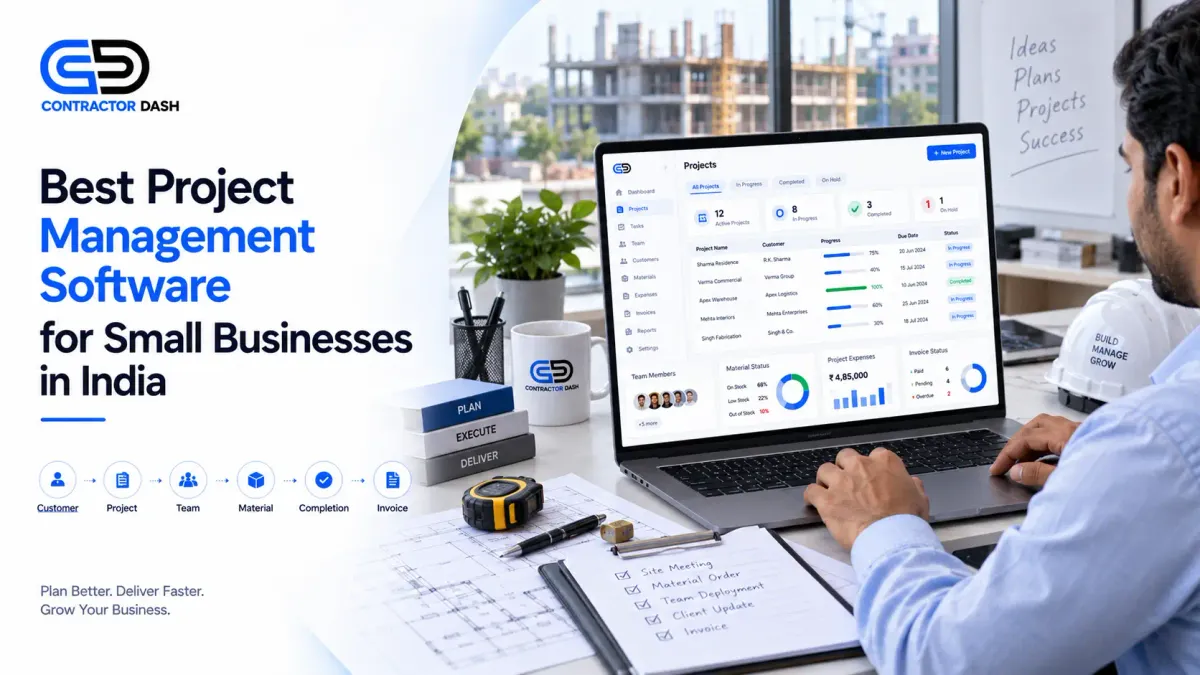
ContractorDash is designed to manage more than tasks and deadlines.
It connects project and site management with:
- CRM
- Lead capture
- Customers
- Quotations
- Invoices
- Inventory
- Material management
- Employees
- Workers
- Attendance
- Payroll
- Vendors
- Subcontractors
- Reports
This means a business can connect the customer and sales process with project execution and billing.
Example
Lead
↓
Customer
↓
Quotation
↓
Approval
↓
Project
↓
Materials
↓
Workers
↓
Invoice
↓
Payment
Instead of managing each stage in separate applications, the business can use one connected platform.
Best suited for: Contractors, construction businesses, solar companies, manufacturers, retailers, wholesalers, service businesses and SMEs managing multiple workflows.
2. Zoho Projects
Zoho Projects focuses on project planning, task management, collaboration and project tracking.
Best for: Teams looking for dedicated project management within a broader software ecosystem.
3. Trello
Trello uses boards, lists and cards to organize work visually.
Best for: Small teams with straightforward task and workflow requirements.
4. Asana
Asana provides project and task management features for teams managing multiple workflows.
Best for: Marketing, operations and knowledge-work teams.
5. Monday.com
Monday.com provides customizable work management and project tracking.
Best for: Teams that want flexible workflows and visual project management.
Project Management Software Comparison
| Feature | ContractorDash | Zoho Projects | Trello | Asana | Monday.com |
|---|---|---|---|---|---|
| Project Management | ✅ | ✅ | ✅ | ✅ | ✅ |
| Task Management | ✅ | ✅ | ✅ | ✅ | ✅ |
| Customer/CRM | ✅ | Ecosystem | ❌ | Limited | Limited |
| Quotations | ✅ | Separate/Ecosystem | ❌ | ❌ | ❌ |
| Invoicing | ✅ | Ecosystem | ❌ | ❌ | Limited |
| Inventory | ✅ | Separate/Ecosystem | ❌ | ❌ | Limited |
| Material Management | ✅ | ❌ | ❌ | ❌ | Limited |
| Employee Management | ✅ | Limited | ❌ | Limited | Limited |
| Payroll | ✅ | Separate | ❌ | ❌ | ❌ |
| Vendor Management | ✅ | Limited | ❌ | ❌ | Limited |
| Site Management | ✅ | ❌ | ❌ | ❌ | Limited |
| Business Reports | ✅ | ✅ | Limited | ✅ | ✅ |
Features and integrations can vary by plan and product configuration. Verify current availability before purchasing.
Project Management Is More Than Task Management
This is an important distinction for small businesses.
A task management tool may tell you:
"Install solar panels — Assigned to Rahul — Due Friday."
But a business may need much more information:
- Which customer?
- Which project?
- Which quotation?
- What is the project value?
- What materials are required?
- What materials have been consumed?
- Which workers are assigned?
- What expenses have occurred?
- Has the customer been invoiced?
- How much has been paid?
- Is the project profitable?
That's the difference between task management and business project management.
Why Project Management Should Connect With CRM
Projects often begin with a customer enquiry.
The sales team receives the lead.
The customer discusses requirements.
A quotation is created.
After approval, the project begins.
If CRM and project management are disconnected, the project manager may have to ask the sales team for customer information.
An integrated workflow can connect:
Lead → Customer → Quotation → Project
This creates better continuity from sales to operations.
Why Project Management Should Connect With Inventory
This is particularly important for businesses that use materials.
For example, a contractor may have three active sites.
Site A needs 100 bags of cement.
Site B needs steel.
Site C needs electrical materials.
If inventory is maintained separately from projects, it's difficult to know where materials are being consumed.
Connecting project and material management can provide better visibility into:
What material was purchased?
Where was it used?
How much remains?
Which project consumed it?
This can also help businesses analyze project costs more accurately.
Why Project Management Should Connect With Invoicing
Project completion and billing are often connected.
A business may bill:
- At project milestones
- After completing specific work
- Monthly
- On delivery
- On project completion
If project and invoicing systems are disconnected, accounts teams may have to manually confirm project status before billing.
A connected system can make this process more organized.
Project Management for Different Industries
Project management isn't limited to construction.
Construction
Customer → Quotation → Site → Materials → Workers → Project → Invoice
Solar
Lead → Site Survey → Quotation → Installation → Materials → Project → Invoice
Manufacturing
Customer → Quotation → Order → Materials → Production/Operations → Delivery → Invoice
Interior Design
Lead → Customer → Quotation → Design Project → Materials → Execution → Invoice
Service Businesses
Lead → Quotation → Project → Tasks → Completion → Invoice
This is why project management software should be selected according to your business workflow.
When Should a Small Business Start Using Project Management Software?
You don't need sophisticated project software on day one.
But consider moving to dedicated software when:
- You manage several projects simultaneously.
- Tasks are regularly missed.
- Customers frequently ask for project updates.
- Employees aren't clear about responsibilities.
- Project deadlines are difficult to track.
- Materials are being used across multiple projects.
- Project costs aren't clear.
- You struggle to identify profitable projects.
- Your team relies heavily on WhatsApp and Excel.
At that point, project management software can become a productivity tool rather than just another subscription.
Project Management Software vs Excel
| Requirement | Excel | Project Management Software |
|---|---|---|
| Project Tracking | Manual | ✅ |
| Task Assignment | Limited | ✅ |
| Deadlines | Manual | ✅ |
| Team Visibility | Limited | ✅ |
| Customer Information | Separate | Connected in some platforms |
| Material Tracking | Manual | Available in integrated platforms |
| Project Cost | Manual | Available in some platforms |
| Invoice Connection | Separate | Available in integrated platforms |
| Reports | Manual | ✅ |
Excel can still be useful for analysis and custom calculations.
But it shouldn't have to be the central system for managing every project.
How ContractorDash Fits Into the Workflow
ContractorDash takes a broader approach.
Instead of treating project management as a standalone feature, it connects projects with the rest of the business.
Your team can manage:
CRM
Customer and lead information
↓
Quotation
What was promised to the customer
↓
Project
What needs to be delivered
↓
Material
What is required and consumed
↓
Employees / Workers
Who is doing the work
↓
Invoice
What needs to be billed
↓
Reports
How the business is performing
This gives management a much clearer view of the entire business process.
Frequently Asked Questions
What is the best project management software for small businesses?
The best software depends on the type of work you manage. Teams focused mainly on digital tasks may need a dedicated project management tool, while contractors and operational businesses may benefit from a platform that also manages customers, quotations, materials and invoices.
Is project management software useful for small businesses?
Yes. It can help businesses organize projects, assign responsibilities, track deadlines and improve visibility as the number of projects increases.
Can project management software manage employees?
Some business platforms connect project management with employee and worker management. This can be useful when employees are assigned to specific projects or sites.
Can project management software track project costs?
Some platforms provide project cost tracking or connect project data with expenses, materials and billing.
Can I manage multiple projects at the same time?
Yes. Most dedicated project management platforms support multiple projects, while integrated business platforms can also connect those projects with customers, materials and invoices.
Is project management software better than Excel?
For simple projects, Excel may be enough. As projects become more complex, dedicated software provides better task tracking, team visibility, reminders and reporting.
Conclusion
Project management isn't simply about creating tasks and checking them off.
For a growing business, projects are connected to customers, quotations, employees, materials, vendors, expenses, invoices and payments.
That's why choosing software only because it has a good task board may not be enough.
The better question is:
Can this software help me manage the complete project workflow?
For businesses managing operational projects, an integrated platform can eliminate the need to connect multiple disconnected tools manually.
With ContractorDash, businesses can bring CRM, quotations, invoicing, inventory, material management, projects, employees, workers, vendors and reports into one connected business platform.
Manage Your Projects and Your Entire Business From One Platform
Your project doesn't exist separately from your business.
It starts with a customer.
It may require a quotation.
It uses employees and materials.
It eventually creates an invoice.
And management needs to know whether it was profitable.
ContractorDash connects these workflows in one platform, helping businesses reduce disconnected systems and manage more of their operations from a single place.
Book a free demo and see how ContractorDash can fit into your complete business workflow.